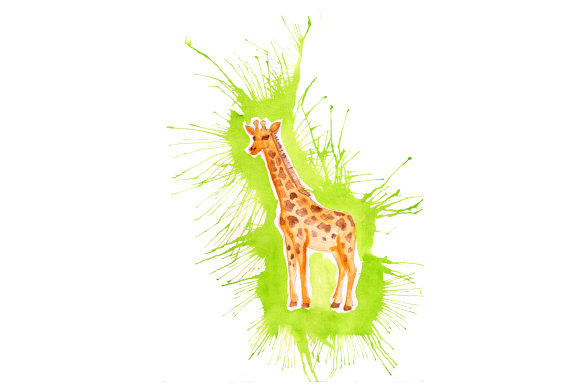
Giraffe in Paint Splatter Watercolor Style
There is something instantly disarming about a giraffe rendered in loose watercolor splatters. The first time I opened the file, I immediately pictured it on a soft, cream-colored linen pillow cover—something that would sit in a sunlit nursery or a quiet reading corner. The design isn’t a rigid, hyper-realistic animal portrait. It’s a playful, artistic interpretation that feels both modern and gentle. The splattered paint effect gives the giraffe a sense of movement, as if the long neck and subtle spots are emerging from a wash of color. The visual personality is warm, whimsical, and slightly painterly, which makes it a strong candidate for projects that aim to feel handmade rather than mass-produced.
From an embroidery designer’s perspective, the first thing I noticed was how the shapes would translate into stitches. The paint splatter watercolor style introduces a beautiful challenge: the transitions between color blobs aren’t hard-edged, so you’ll need to think carefully about how to digitize those soft overlaps. The giraffe’s silhouette is clear, with the tall neck and gentle head providing a recognizable anchor. This means you can play with the background splatters without losing the subject. The layout is vertically oriented, which suits products like tote bags, sweatshirts, and pillow covers where a tall, narrow composition feels natural.
First Impressions and the Mood It Creates
The design carries a quiet, storybook charm. It’s not loud or aggressive—even with the splatter effect, the overall feel is soft and approachable. The watercolor style suggests hand-painted details, which immediately adds a layer of artisanal value. When I imagine a customer seeing this on a finished product, I think of someone who loves wildlife, art, or nursery décor. The giraffe is a universally loved animal, and the paint splatter treatment keeps it from feeling too childish. It strikes a balance that works for both baby items and adult accessories.
The transparent PNG and SVG files included in the download give you a clean starting point. The transparent background means you can easily place the design on mockups of dark fabric, light fabric, or even patterned backgrounds to see how it will behave. The EPS and DXF formats are especially useful if you plan to scale the design for larger projects or send it to a professional digitizer. Having these file types means you’re not locked into one workflow—you can adapt the design to screen printing, vinyl, or embroidery with the same core art.
Where This Design Shines in Real Embroidery Projects
Last weekend, I tested this giraffe concept on a mid-weight canvas tote bag. I wanted to see how the watercolor splatters would read after stitching. I digitized the design using a combination of fill stitches with varied densities and a few satin stitch accents for the finer details around the eye and ears. The result was lovely. The splatters added texture without becoming chaotic, and the giraffe’s profile remained crisp. I could immediately see this working on a set of matching kitchen towels, a baby onesie, or a zippered pouch for a boutique product line.
On apparel, the design has a lot of potential. A sweatshirt with this giraffe placed off-center on the chest feels like a small-batch, artist-made piece. For a t-shirt, you might use the design as a back print, but I’d be careful with the size—the vertical shape can look awkward on a curved torso if it’s too large. On a cap, the design becomes trickier. The splatters and the tall neck don’t translate well to a small, curved embroidery field. I’d avoid caps unless you’re willing to simplify the design significantly and test on a structured cap with a center seam.
Baby items are a natural fit. The gentle, non-threatening animal image and the soft watercolor effect feel right for a onesie, a bib, or a small security blanket. I’d recommend using a soft, low-loft stabilizer on knits to prevent puckering, and I’d keep the stitch count moderate so the fabric remains breathable. A nursery wall hanging or a embroidered hoop art piece would also be a smart use of this design. The painterly quality makes it look like a stitched illustration, and customers often respond well to framed embroidery as a gift.
How the Watercolor Splatter Behaves in Stitch Form
The paint splatter detail is simultaneously the design’s biggest asset and its greatest technical consideration. In the source file, the splatters are irregular blobs with soft edges. To replicate that in embroidery, you’ll need to use a digitizing approach that layers thread colors and maybe even incorporates a few small motif runs or jagged fill clusters. A straight satin stitch outline around the splatters would kill the watercolor illusion. Instead, I found that using a mix of fill stitches with slightly uneven edges, and allowing some underlay to peek through, creates a much more organic look.
Thread color choices matter enormously here. The design’s mood depends on a palette that feels like translucent paint. I tested a set of dusty rose, mustard, muted teal, and soft gray threads, and the giraffe still looked cohesive. If you’re making a holiday gift, you could shift to cooler blues and silvers for a wintery feel. The key is to avoid harsh, solid colors that read as flat shapes. The watercolor effect relies on subtle variation, so I’d recommend using at least three to four thread colors in the splatter area, even if the original art appears to have just two.
Running a few test stitches on scrap fabric is non-negotiable. I always check the design on both a light cotton and a dark denim to see how the splatters pop. On dark fabric, some of the more delicate splatters may disappear, so you might need to add a light underlay or adjust the color sequence. The transparent PNG can help you visualize this before you even start digitizing, and I’d recommend using it to create quick mockups in different colorways.
Ideal Products and Placement Ideas
- Tote bags – The vertical shape fits perfectly on the front panel of a standard canvas tote. Use a medium hoop size and center the design.
- Sweatshirts and hoodies – Place the giraffe on the upper back or across the chest. A slightly smaller version also works on a sleeve.
- Nursery pillows – A linen or cotton pillow cover with this design stitched in soft pastels becomes a boutique-quality gift.
- Kitchen towels – A single giraffe near the towel edge adds a whimsical touch without overwhelming the fabric.
- Baby onesies – Keep the design compact and use a soft, tear-away stabilizer to protect delicate skin.
- Embroidery hoop art – Frame the finished piece in a wooden hoop for a quick, sellable handmade product.
- Aprons – A playful giraffe on a neutral apron appeals to both home cooks and boutique shop buyers.
- Patches – If you simplify the splatters slightly, you can make a sew-on or iron-on patch that sells well on Etsy.
Where You Should Use Extra Caution
The design’s vertical orientation and splatter detail mean it doesn’t fit every hoop size comfortably. On a 4x4 inch hoop, the giraffe becomes very small, and the splatters may lose their impact or become muddy. I’d recommend a minimum hoop size of 5x7 inches for most applications, and if you’re going larger, you’ll need to check the digitized file’s stitch density to avoid pulling on thin fabrics.
Stretchy fabrics like jersey or performance knits require extra care. The fill stitches in the splatters can cause puckering if the stabilizer isn’t adequate. I always use a fusible mesh cut-away stabilizer on stretchy garments, and I test on a scrap of the same fabric before committing to the final product. Textured fabrics—like terry cloth or waffle weave—can also distort the watercolor effect, making the splatters look uneven. In those cases, a water-soluble topper helps keep the stitches clean and prevents the design from sinking into the pile.
Layered garments, such as a jacket with a lining, might make hooping difficult. If you’re planning to stitch on a pre-made garment with limited access to the back, consider using a stick-on stabilizer and a magnetic hoop. The design itself isn’t overly dense, but the irregular splatter shapes can still cause registration issues if the fabric shifts during stitching.
How This Design Affects Customer Perception and Sales
When I think about the handmade products I’ve sold, the ones that performed best had a clear artistic point of view. The giraffe in paint splatter watercolor style delivers exactly that. It doesn’t look like a generic clip art animal. It looks like a piece of art someone chose on purpose. That perceived value translates directly into higher customer trust and better engagement in listings. When a buyer sees a photo of a finished tote or onesie with this design, they’re not just seeing a giraffe—they’re seeing a mood, a story, and a level of craftsmanship.
For Etsy sellers or small shop owners, this design helps build brand consistency. If your shop focuses on watercolor-inspired decor, this giraffe fits right into a cohesive product line. You can pair it with other splatter-style animals or floral elements to create a collection. The design also gifts beautifully. I’ve had customers specifically request baby shower gifts with a “painted animal” look, and this giraffe would make a memorable, personalized present without requiring any text customization.
Because the design is available in multiple file formats, you can also use the PNG or SVG for printable mockups, digital product previews, or even as a design asset for creating coordinating prints. This flexibility makes it a smart purchase for creative entrepreneurs who sell both physical and digital goods.
Practical Embroidery Creator Notes
Before you stitch this design onto a client’s garment or a product you plan to sell, here are the steps I follow every time:
- Test on scrap fabric first. Use the same fabric type and color you intend for the final product. Check how the splatters read and whether the thread colors need adjustment.
- Review thread color contrast. The watercolor effect relies on subtle differences. If two adjacent splatters are too similar in tone, they’ll blend into one blob. Increase the contrast slightly if needed.
- Inspect stitch density. The design shouldn’t feel like a stiff patch. Run a density check, especially in areas where multiple splatters overlap.
- Confirm hoop size. The file may not include size information. Measure the design in your editing software and make sure it fits your hoop with enough clearance for the needle.
- Check small details. Zoom in on the giraffe’s eye, ears, and any tiny splatter dots. These can be lost if the design is scaled down too much.
- Test on light and dark backgrounds. The design’s transparency can fool you. Stitch it on a white swatch and a dark swatch to see if the colors hold up.
- Use proper stabilizer. For most woven fabrics, a medium-weight cut-away stabilizer works. For knits, use a fusible cut-away. For towels, add a water-soluble topper.
- Check licensing. The product description says you receive the design in SVG, Transparent PNG, EPS, and DXF formats. It does not specify a commercial use license. Before you sell finished products with this design, verify that the seller permits commercial use. If you plan to resell the digital file itself, confirm the terms separately.
The file formats included—SVG, Transparent PNG, EPS, and DXF—are all excellent for embroidery digitizing. The SVG and EPS files are vector-based, so you can scale the design without losing quality. The DXF format is handy if you need to import the design into a cutting machine or a specific digitizing software that prefers DXF input. The transparent PNG is perfect for quick mockups, color testing, and product photography previews. I wouldn’t rely on the PNG alone for digitizing, though, because it’s a raster file and can’t be scaled up cleanly.
One thing I always remind fellow makers: the artistry of this design is in the paint splatter, not in the precise outline of the giraffe. If you digitize it with rigid, uniform stitches, you’ll lose the soul of the piece. Embrace the irregularity. Let a few thread tails show the direction of the “paint.” Your customers will sense the difference between a rushed production and a thoughtfully crafted piece.
Finally, after stitching a few samples, I’ve found that the giraffe in paint splatter watercolor style becomes a conversation piece. People ask how the watercolor effect was achieved, and that curiosity often leads to a sale. Whether you’re making a tote bag for a craft fair, a custom onesie for a baby shower, or a boutique pillow cover, this design adds a layer of artistic credibility that goes beyond a simple animal silhouette. Just remember to test, adjust, and treat the design like the painterly artwork it is—and you’ll end up with a finished product that feels truly special.