Tiger in Watercolor: Animals & Crafts Design Review
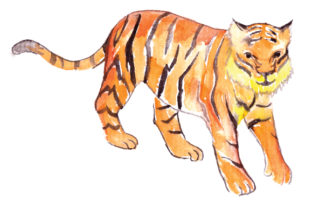
When I first opened the Tiger in Watercolor file, I immediately saw a design that could anchor a small but cohesive product collection. The brushwork feels loose and intentional, not stiff or overly polished. That matters because buyers in the animals and crafts niche tend to respond to artwork that looks handmade, expressive, and slightly imperfect. The watercolor texture gives the tiger a soft, organic presence that reads well on screen and translates nicely to physical products. I have tested enough digital assets to know that the difference between a design that sells and one that sits unnoticed often comes down to whether it feels like it was made by a real artist, not a template mill. This one passes that test.
The tiger itself has a calm, almost contemplative expression. It leans more toward elegant and decorative than cute or fierce. That positions it in a specific part of the animals market, one where buyers are looking for nursery art, journal covers, spa-themed merchandise, or nature-inspired branding. It is not a cartoon. It is not a hyper-realistic wildlife portrait. It sits in a middle space that works well for lifestyle products, feminine branding, and mindful creative projects. If your shop already sells botanical watercolors, abstract landscapes, or soft-toned animal designs, this tiger will fit without disrupting your visual brand.
First Look at the File Package and Formats
The asset arrived as a clean bundle containing an SVG file, a transparent PNG, an EPS, and a DXF. Each format serves a different production path, and having all four in one download means I can test the design across multiple product types without converting files or hunting for alternate versions. The transparent PNG opened with a crisp, well-isolated background. The SVG file imported into Cricut Design Space without extra nodes or jagged edges, which is something I always check before committing to a design for craft products. The EPS file opened cleanly in Adobe Illustrator, and the DXF gave me a solid option for Silhouette software. For a digital product creator selling to crafters, this multi-format approach is practical and customer-friendly.
Testing the Design Across Product Categories
Before I list any graphic design asset for sale, I run it through a mental checklist of real product applications. For Tiger in Watercolor, I started with printable wall art because the watercolor texture naturally suits that category. I placed the PNG on a mockup of a framed print in a soft cream nursery setting. The result looked intentional and calm, the kind of piece that would photograph well in a styled room. I then tested it as a tote bag graphic on a light canvas background. The colors held their saturation, and the transparent edges blended smoothly into the fabric mockup.
Next, I moved to smaller merchandise. I scaled the design down for a mug template and a set of greeting cards. On the mug, the tiger needed slight repositioning to center well within the printable area, but the resolution held up. For the greeting card, I paired it with a simple serif font and a soft blush envelope. The combination felt premium and ready for a stationery bundle. I also tested the SVG file on a simple cotton t-shirt mockup, using a warm off-white shirt color. The design transferred cleanly, and the watercolor edges looked soft rather than pixelated, which is a common risk when scaling rasterized textures.
Where the Design Performs Best
After several rounds of mockup testing, I found that Tiger in Watercolor works best in applications where the organic brushwork can be appreciated at a moderate to large scale. Products like tote bags, framed prints, notebook covers, and throw pillow designs let the watercolor details breathe. The design also translates well into digital download products, especially printable art sets, Canva template elements, and social media graphics for brands that want a soft, nature-inspired aesthetic.
For Cricut users, the SVG file cuts smoothly on adhesive vinyl and heat transfer vinyl. I tested it on a simple cardstock project and the lines were clean enough for a layered paper craft. The absence of overly intricate internal cuts means beginners can use it without frustration, while experienced crafters can layer it with text or floral elements to build more complex compositions. This versatility makes it a strong candidate for inclusion in a larger crafts bundle or a seasonal digital download collection.
Real Shop Scenario: Building a Collection Around the Asset
Imagine you are preparing a new product line for an Etsy shop that sells printable nursery art and matching craft templates. You already have a few watercolor animal designs in your catalog, but you need something to round out the collection. Tiger in Watercolor arrives as a flexible starting point. You test it on a framed print mockup, then on a set of milestone cards, then on a simple birth announcement template. Each application uses the same core design, but the product variety makes your shop feel fuller and more intentional.
You photograph or render the products together, using consistent mockup styling and a soft earthy color palette. The tiger becomes the unifying visual element across a printable art print, a matching invitation template, a set of stickers, and a sublimation-ready mug design. Buyers browsing your shop see a cohesive collection rather than a scattered assortment of unrelated graphics. That kind of visual consistency builds trust and increases the perceived value of your entire catalog.
Thumbnail and Listing Presentation Considerations
One of the most practical steps I take before listing any digital product is to preview how it looks as a small marketplace thumbnail. Many designs that look stunning at full size lose their impact when shrunk to a search result image. Tiger in Watercolor held up well in thumbnail testing because the tiger silhouette is distinct and the watercolor contrast is strong enough to read clearly at a small scale. I recommend using a light, neutral background for the main listing image, something like a soft linen or a warm cream, to let the tiger's colors stand out without competing with the composition.
For Etsy sellers and Creative Fabrica contributors, the thumbnail is often the only chance to catch a buyer's attention. A design with clear visual hierarchy and recognizable subject matter has an advantage. The tiger shape is instantly recognizable, even at small sizes, and the watercolor style signals a certain aesthetic that attracts buyers looking for artisan-quality digital downloads rather than generic clipart.
Where Caution Is Needed
No design asset works everywhere, and honest evaluation means identifying where Tiger in Watercolor might need extra attention. The watercolor texture, while beautiful at larger sizes, can become muddy or indistinct when scaled down to very small sticker dimensions. If you plan to use this design for tiny planner stickers or miniature icons, test the print quality first. The soft edges that make the design appealing on a tote bag can look blurry on a quarter-inch sticker.
Dark backgrounds also require testing. The watercolor pigments may not pop as well against black or deep navy, and the transparent PNG might show unexpected edge artifacts when placed on high-contrast backgrounds. I always test every design on both white and dark mockups before finalizing a listing. Additionally, crafters using Cricut or Silhouette machines for intricate cuts should check the SVG import carefully. While the file I tested imported cleanly, watercolor-style designs with soft edges can occasionally produce unexpected cut paths that need manual adjustment.
Font Pairing Experiments for Template Sellers
If you sell Canva templates, editable invitations, or printable stationery, font pairing is a critical part of making the design work commercially. I tested Tiger in Watercolor with a variety of font styles to see which combinations felt intentional. A clean sans serif font created a modern, minimal look that worked well for social media graphics and simple quote art. A delicate script font added a romantic, feminine feel that suited wedding invitations and baby shower templates. A serif font gave the design a more traditional, literary quality that would work for book covers and journal designs.
For crafters building layered projects, a handwritten font paired with the tiger created a personal, scrapbook-style aesthetic. The key is to test your specific font choices on the same mockup where the design will appear. What looks balanced in isolation can feel crowded or mismatched when placed together on a finished product. I recommend keeping the text simple and letting the watercolor tiger remain the focal point rather than competing with overly decorative typography.
Commercial Licensing and Seller Confidence
Before listing any product that uses Tiger in Watercolor, confirm the commercial license terms. As a digital product creator, I always verify whether an asset can be used on physical merchandise, digital downloads, or both. The last thing any seller wants is to build a successful product line around a design only to discover licensing restrictions later. Check the included license documentation, and if the terms are unclear, reach out to the original creator for clarification. Transparency about licensing protects your business and maintains the trust of your customers.
Practical Testing Steps Before Publishing
Every experienced seller develops a pre-listing routine. For Tiger in Watercolor, my testing process included printing the design on matte paper to check color accuracy, running the SVG through a test cut on adhesive vinyl, and previewing the design on at least five different product mockups. I also checked the transparent PNG against light and dark backgrounds, verified the file resolution at the largest intended print size, and organized the files into a clearly labeled folder structure that would make sense to a customer downloading the bundle.
Small details like consistent file naming, clean folder organization, and a simple instruction sheet can reduce customer confusion and prevent negative reviews. When I package a digital download for sale, I want the buyer to open the folder and immediately understand what each file is for. Clear labeling of the SVG, PNG, EPS, and DXF files helps crafters, designers, and small business owners start creating without frustration.
Final Assessment for Digital Sellers
After testing Tiger in Watercolor across multiple product categories, mockup styles, and production workflows, I see it as a solid addition to a digital product catalog focused on animals, crafts, and lifestyle design. It is not a universal solution for every niche, but it performs reliably in the areas where watercolor animal art typically sells best. The inclusion of multiple file formats makes it versatile for Cricut projects, sublimation designs, printable products, and commercial merchandise. For sellers who already know their audience responds to soft, expressive animal illustrations, this asset is worth testing in a small batch of listings before scaling into a full collection.
The most successful digital product creators are not the ones with the largest catalogs. They are the ones who test carefully, present professionally, and understand exactly where each design adds value. Tiger in Watercolor has a clear place in that kind of thoughtful, business-minded product strategy.